

99% of software developers, course creators, and even well-known frameworks, misunderstand MVC. The MVC pattern was originally created to help build interactive user interfaces, not backend systems. Its main purpose was to help designers think in terms of the user’s own mental model of the Thing being represented.
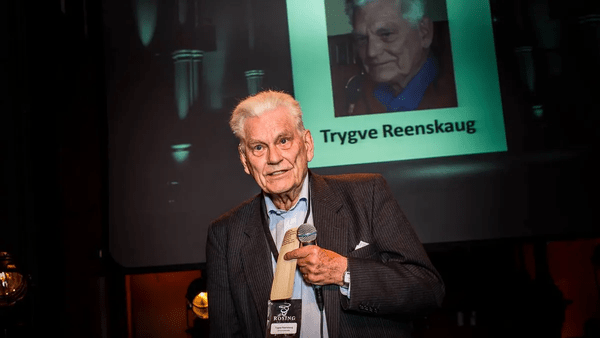
Prof. Trygve Reenskaug first came up with the Thing-Model-View-Editor (TMVE) concept while working at Xerox PARC in 1978-79. This idea became the foundation for the Model-View-Controller (MVC) architecture, which was later implemented as a practical design pattern in Smalltalk around 1980.
“The essential purpose of MVC is to bridge the gap between the human user’s mental model and the digital model that exists in the computer.”
— Prof. Trygve Reenskaug
The Thing
The Thing in Thing-Model-View-Editor (TMVE) was the real-world subject of interest:
It could be concrete, like a house or an integrated circuit. It could be abstract, like a new idea or opinions about a paper. It could be a whole, like a computer, or a part, like a circuit element.
— Prof. Trygve Reenskaug
There’s no one “right” way to look at the Thing. There are many ways to create useful abstractions, of the same Thing, depending on what the user needs to see and do.
Later, in MVC, the Thing was removed, and Editor renamed to Controller, but it is still very important to understand this concept.
The Roles of Model, View and Controller
With that foundation, let’s examine the three parts of MVC one by one.
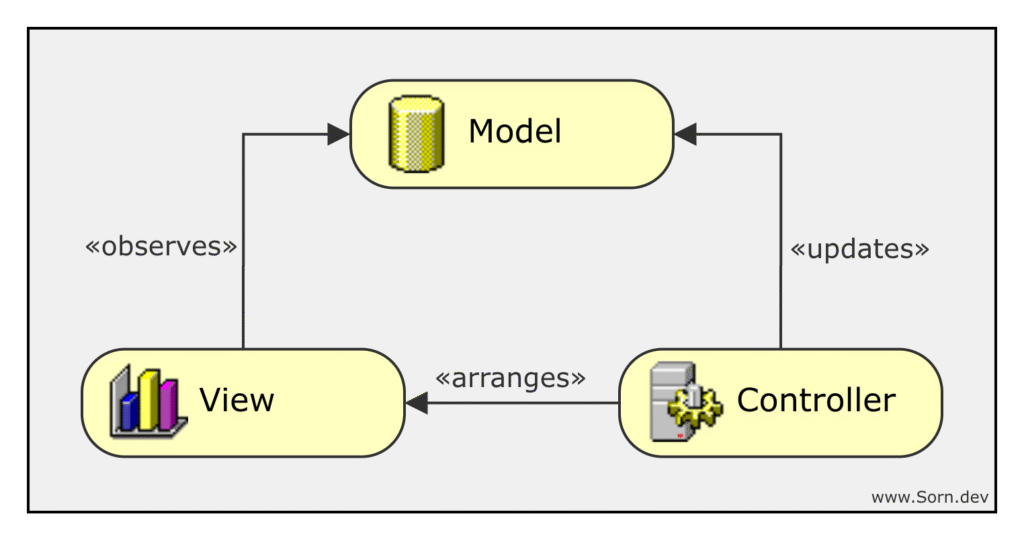
Model
The Model is the active representation (not passive data) of the Thing inside the computer:
- It encapsulates business logic and enforces invariants (rules that must always hold true).
- It provides operations that allow querying and updating its state.
- It notifies all of its observers (Views) when it changes.
- It must never depend on either the View or the Controller.
View
The View is a (visual) representation of a Model:
- It observes the Model and updates itself when the Model changes.
- It highlights certain attributes while hiding others, based on user needs.
- It does not contain business logic.
- It can call methods on the Model to read data.
- It should not call methods to change the Model’s state.
- It does not interpret any user input, such as mouse operations and keystrokes.
Controller
The Controller receives user input (keyboard, mouse, …) and coordinates changes to the Model and/or View.
- It updates the Model.
- It arranges its own View(s).
In the original TMVE concept, there was also the Editor.
Some views provide a special controller, an editor, that permits the user to modify the information that is presented by the view … Once the editing process is completed, the editor is removed from the path and discarded. — Prof. Trygve Reenskaug (10 December 1979)
Now that we understand the roles of Model, View, and Controller, let’s see how they come together in a real application.
Case Study: Java Swing MVC To-Do List App
Full code below
To see MVC in action, let’s create a simple To-Do List app with Java Swing. The app allows users to view and manage the Things they care about, in this case their “to-dos”, while keeping data, presentation, and control cleanly separated.
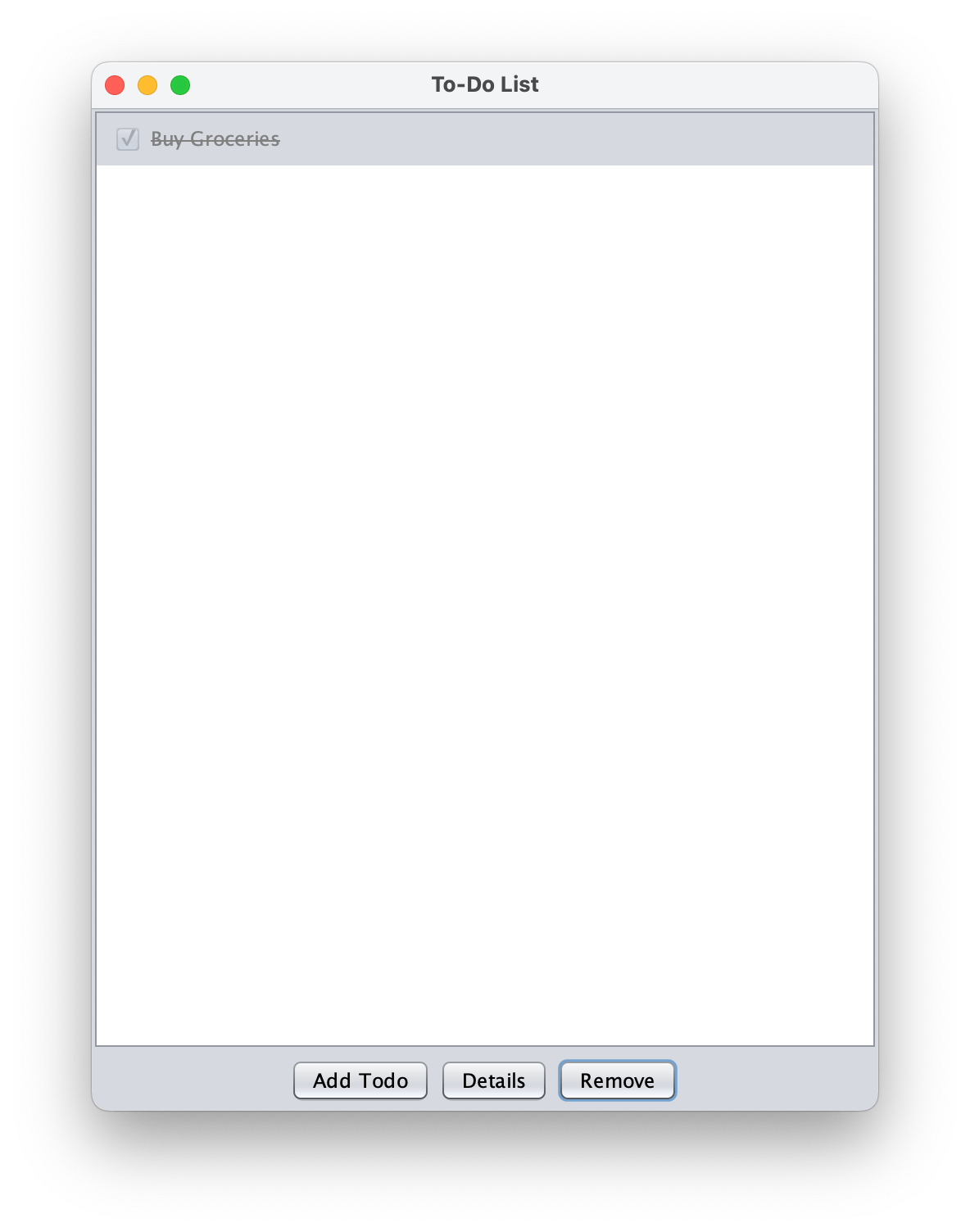
High-Level Architecture
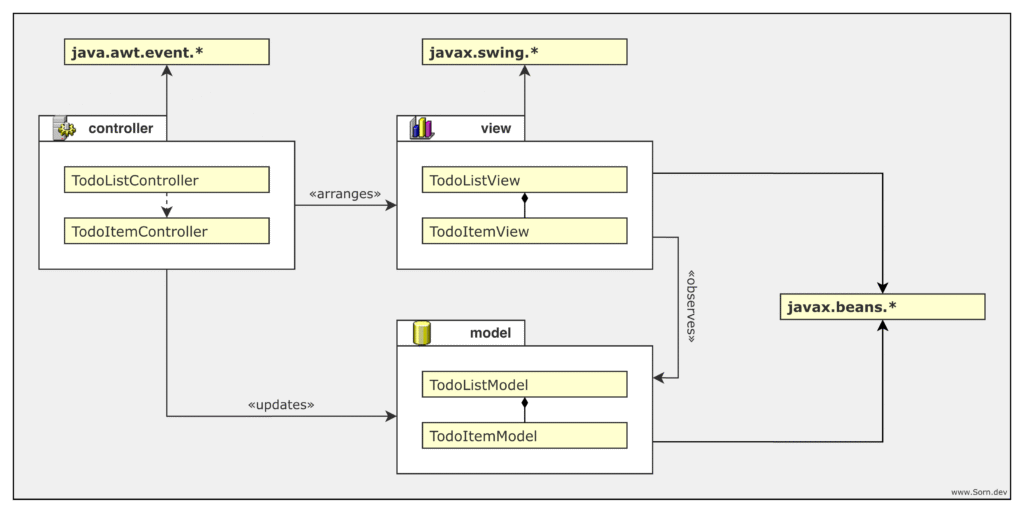
Models, Views, and Controllers all working together
Models have only one dependency: javax.beans.*, which provides built-in support for the Observer Pattern, to notify Views that have registered with it.
Views use javax.swing.* to create UI elements such as text fields and buttons. They implement javax.beans.PropertyChangeListener to listen for updates from the Model. Views depend on the Model.
Controllers use java.awt.event.* to handle user input by creating java.awt.event.ActionListeners, which manage creating, removing, and editing to-dos. Controllers depend on both the Model and the View.
A quick way to check if your design follows MVC rules:
– Views should not import java.awt.event.*
– Controllers should not import javax.swing.*
Use Cases
We have three main use cases:
- Adding a new todo
- Removing an existing todo
- Editing an existing todo
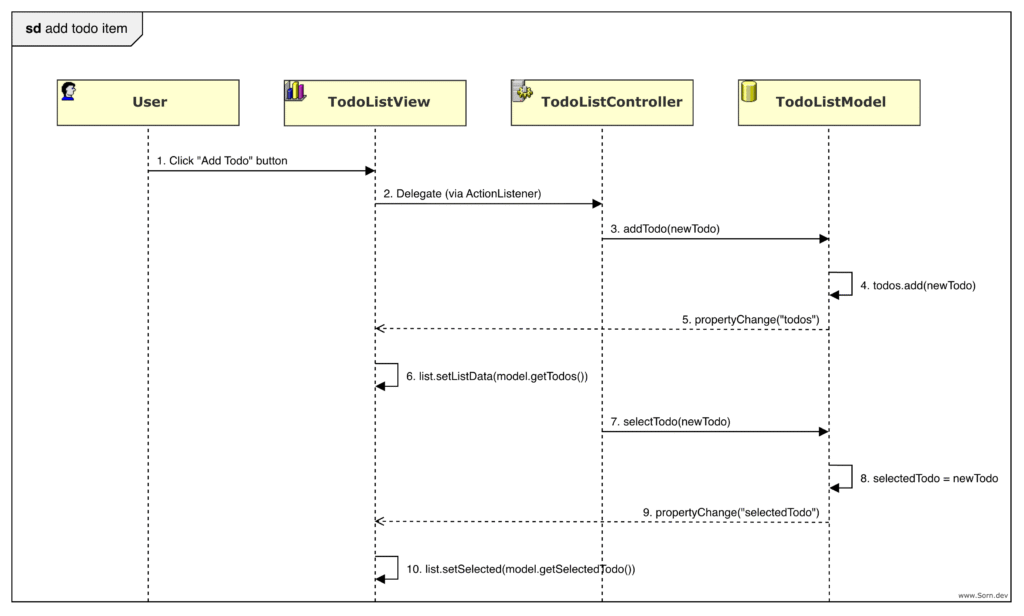
Models
The Thing we want to model is a to-do list with individual to-do items:
- TodoListModel: represents the entire to-do list and manages its state.
- TodoItemModel: represents a single to-do item.
Why selection is in the Model: In our TodoListModel, we manage the currently selected item because this reflects the user’s mental model, i.e. their current focus or working context, not just a visual UI state.
Views
Next, we want to create visual representations of our Models. Each Model can have one or more Views, depending on what the user needs to see. We have one view for the entire list and one for editing an item.
- TodoListView: displays the entire to-do list.
- TodoItemView: displays an editor for a single to-do item.
Deviations from original MVC
In the original 1979 specification, Views were purely for visual display, while Controllers directly managed all low-level user input.
In this guide, Views contain interactive Swing components like JButtons, which handle their own low-level events and instead we delegate higher-level events to Controllers. This was a practical adaptation for the Java Swing environment.
Controllers
Finally, we need to handle user input, like adding new to-dos, editing and removing existing to-dos.
- TodoListController: handles adding and removing to-dos, and manages the lifecycle (creating and destroying) TodoItemControllers.
- TodoItemController: is an Editor for editing existing to-dos.
Who Still Gets MVC Right?
As I mentioned in the intro, almost everyone gets MVC wrong: developers, course creators, and even entire frameworks. Most online tutorials just regurgitate a shallow definition without really understanding it themselves. And, modern frameworks have watered MVC down into a loose metaphor for “routing + templates + database models.” But that isn’t MVC; that’s simply layered web architecture.
Here’s how frameworks actually compare to the original idea of MVC:
| Smalltalk / Squeak MVC (⭐⭐⭐⭐⭐) Literally the birthplace. True observer-based MVC, live model-view sync, controllers interpret user input. |
| JavaScript / Backbone.js (⭐⭐⭐⭐) Revived the true reactive MVC idea in the browser: live model-view sync, however, controllers are part of the view. Closest after Squeak MVC. |
| Objective-C / Cocoa (⭐⭐⭐⭐) Models, views, and controllers are real objects, not just request handlers, but all view-model communication is done via controllers. |
| Ruby / Ruby on Rails (⭐⭐⭐) Models have business logic, views observe data, controllers mediate, but still request-based. |
| Java / Spring MVC (⭐⭐) MVC is mostly a structural metaphor for web layers (not observer-driven): model = ORM entity, view = rendered template, controller = HTTP endpoint request handler |
| C# / ASP.NET MVC (⭐⭐) Same as Spring MVC. |
| PHP / Laravel (⭐⭐) Same as Spring MVC. |
Then Why Did I Use Java?
For better or worse, Java remains the language of choice for enterprise applications. From my own experience at some of the world’s largest fintechs, most enterprise codebases are overwhelmingly Java-based (at least in finance). Java is also the language I know best.
That said, Java is not without its critics: Reenskaug himself noted at Øredev 2009 (10:08), “Java and Simula are not object-oriented, but rather class-oriented.” Consequently, my choice of language may not be the ideal example for demonstrating object-oriented principles such as MVC, but using Java allows this reading to reach the widest possible audience of developers.
Full Code
model/Model.java
package todo.model;

import java.beans.PropertyChangeListener;
import java.beans.PropertyChangeSupport;

public abstract class Model {
    protected final PropertyChangeSupport pcs = new PropertyChangeSupport(this);

    protected Model() {}

    public final void addListener(PropertyChangeListener listener) {
        pcs.addPropertyChangeListener(listener);
    }

    public final void removeListener(PropertyChangeListener listener) {
        pcs.removePropertyChangeListener(listener);
    }
}model/TodoItemModel.java
package todo.model;

public final class TodoItemModel extends Model {
    private String title;
    private String description;
    private boolean completed;

    public TodoItemModel(String title, String description) {
        this.title = title;
        this.description = description;
        this.completed = false;
    }

    public String getTitle() {
        return title;
    }

    public String getDescription() {
        return description;
    }

    public boolean isCompleted() {
        return completed;
    }

    public void setTitle(String title) {
        String oldValue = this.title;
        this.title = title;
        pcs.firePropertyChange("title", oldValue, title);
    }

    public void setDescription(String description) {
        String oldValue = this.description;
        this.description = description;
        pcs.firePropertyChange("description", oldValue, description);
    }

    public void setCompleted(boolean completed) {
        boolean oldValue = this.completed;
        this.completed = completed;
        pcs.firePropertyChange("completed", oldValue, completed);
    }
}model/TodoListModel.java
package todo.model;

import java.util.ArrayList;
import java.util.List;

public final class TodoListModel extends Model {
    private final List<TodoItemModel> todos;
    private TodoItemModel selectedTodo;

    public TodoListModel() {
        this.todos = new ArrayList<>();
    }

    public TodoItemModel[] getTodos() {
        return todos.toArray(TodoItemModel[]::new);
    }

    public TodoItemModel getSelectedTodo() {
        return selectedTodo;
    }

    public void selectTodo(TodoItemModel selectedTodo) {
        TodoItemModel oldValue = this.selectedTodo;
        this.selectedTodo = selectedTodo;
        pcs.firePropertyChange("selectedTodo", oldValue, selectedTodo);
    }

    public void addTodo(TodoItemModel todo) {
        todos.add(todo);
        pcs.firePropertyChange("todos", null, todos);
        todo.addListener(event -> pcs.firePropertyChange("todos", null, todos));
    }

    public void removeTodo(TodoItemModel todo) {
        if (todos.remove(todo)) {
            pcs.firePropertyChange("todos", null, todos);
        }
    }
}view/TodoItemView.java
package todo.view;

import todo.model.TodoItemModel;
import javax.swing.BoxLayout;
import javax.swing.JButton;
import javax.swing.JCheckBox;
import javax.swing.JDialog;
import javax.swing.JLabel;
import javax.swing.JPanel;
import javax.swing.JScrollPane;
import javax.swing.JTextArea;
import javax.swing.JTextField;
import java.awt.BorderLayout;
import java.awt.FlowLayout;
import java.beans.PropertyChangeEvent;
import java.beans.PropertyChangeListener;

public final class TodoItemView extends JDialog implements PropertyChangeListener {
    private final TodoItemModel model;
    private JTextField titleField;
    private JTextArea descriptionArea;
    private JCheckBox completedCheckbox;
    private JButton saveButton;
    private JButton cancelButton;

    public TodoItemView(TodoItemModel model) {
        super();
        super.setTitle("Todo Details");
        this.model = model;
        model.addListener(this);

        JPanel formPanel = createFormPanel();
        JPanel buttonPanel = createButtonPanel();

        titleField.setText(model.getTitle());
        descriptionArea.setText(model.getDescription());
        completedCheckbox.setSelected(model.isCompleted());

        super.setLayout(new BorderLayout());
        super.setSize(400, 350);
        super.add(formPanel, BorderLayout.CENTER);
        super.add(buttonPanel, BorderLayout.SOUTH);
        super.setVisible(true);
    }

    private JPanel createFormPanel() {
        JPanel panel = new JPanel();
        panel.setLayout(new BoxLayout(panel, BoxLayout.Y_AXIS));

        JPanel titlePanel = new JPanel(new BorderLayout(5, 0));
        titlePanel.add(new JLabel("Title:"), BorderLayout.WEST);
        titleField = new JTextField(20);
        titlePanel.add(titleField, BorderLayout.EAST);
        panel.add(titlePanel);

        JPanel descPanel = new JPanel(new BorderLayout(5, 0));
        descPanel.add(new JLabel("Description:"), BorderLayout.WEST);
        descriptionArea = new JTextArea(5, 20);
        descPanel.add(new JScrollPane(descriptionArea), BorderLayout.EAST);
        panel.add(descPanel);

        completedCheckbox = new JCheckBox("Completed");
        panel.add(completedCheckbox);

        return panel;
    }

    private JPanel createButtonPanel() {
        JPanel buttonPanel = new JPanel(new FlowLayout());
        saveButton = new JButton("Save");
        cancelButton = new JButton("Cancel");
        buttonPanel.add(saveButton);
        buttonPanel.add(cancelButton);
        return buttonPanel;
    }

    public JButton getSaveButton() {
        return saveButton;
    }

    public JButton getCancelButton() {
        return cancelButton;
    }

    public JTextField getTitleField() {
        return titleField;
    }

    public JTextArea getDescriptionArea() {
        return descriptionArea;
    }

    public JCheckBox getCompletedCheckbox() {
        return completedCheckbox;
    }

    @Override
    public void propertyChange(PropertyChangeEvent event) {
        switch (event.getPropertyName()) {
            case "title" -> titleField.setText(model.getTitle());
            case "description" -> descriptionArea.setText(model.getDescription());
            case "completed" -> completedCheckbox.setSelected(model.isCompleted());
        }
    }

    @Override
    public void dispose() {
        super.dispose();
        model.removeListener(this);
    }
}view/TodoListView.java
package todo.view;

import todo.model.TodoItemModel;
import todo.model.TodoListModel;
import javax.swing.BorderFactory;
import javax.swing.JButton;
import javax.swing.JCheckBox;
import javax.swing.JLabel;
import javax.swing.JList;
import javax.swing.JOptionPane;
import javax.swing.JPanel;
import javax.swing.JScrollPane;
import javax.swing.ListCellRenderer;
import java.awt.BorderLayout;
import java.awt.Color;
import java.awt.Component;
import java.awt.FlowLayout;
import java.beans.PropertyChangeEvent;
import java.beans.PropertyChangeListener;

public final class TodoListView extends JPanel implements PropertyChangeListener {
    private final TodoListModel model;
    private final JList<TodoItemModel> list;
    private final JButton addButton;
    private final JButton detailsButton;
    private final JButton removeButton;

    public TodoListView(TodoListModel model) {
        this.model = model;
        this.list = new JList<>(model.getTodos());
        this.list.setCellRenderer(new TodoListCellRenderer());
        this.addButton = new JButton("Add Todo");
        this.detailsButton = new JButton("Details");
        this.removeButton = new JButton("Remove");

        JPanel buttonPanel = new JPanel(new FlowLayout());
        buttonPanel.add(addButton);
        buttonPanel.add(detailsButton);
        buttonPanel.add(removeButton);

        super.setLayout(new BorderLayout());
        super.add(new JScrollPane(list), BorderLayout.CENTER);
        super.add(buttonPanel, BorderLayout.SOUTH);

        model.addListener(this);

        if (model.getTodos().length != 0) {
            list.setSelectedIndex(0);
        }
    }

    public JList<TodoItemModel> getList() {
        return list;
    }

    public JButton getAddButton() {
        return addButton;
    }

    public JButton getDetailsButton() {
        return detailsButton;
    }

    public JButton getRemoveButton() {
        return removeButton;
    }

    public void showWarning(String message) {
        JOptionPane.showMessageDialog(this, message, "Warning", JOptionPane.WARNING_MESSAGE);
    }

    public boolean showConfirmDialog(String message) {
        int result = JOptionPane.showConfirmDialog(this, message, "Confirm", JOptionPane.YES_NO_OPTION);
        return result == JOptionPane.YES_OPTION;
    }

    public TodoItemModel getSelectedTodo() {
        return list.getSelectedValue();
    }

    @Override
    public void propertyChange(PropertyChangeEvent event) {
        if ("todos".equals(event.getPropertyName())) {
            TodoItemModel[] todos = model.getTodos();
            list.setListData(todos);
        }
        if ("selectedTodo".equals(event.getPropertyName())) {
            TodoItemModel selected = model.getSelectedTodo();
            list.setSelectedValue(selected, true);
        }
    }

    private static class TodoListCellRenderer extends JPanel implements ListCellRenderer<TodoItemModel> {
        private final JCheckBox completedCheckbox;
        private final JLabel titleLabel;

        public TodoListCellRenderer() {
            this.completedCheckbox = new JCheckBox();
            this.completedCheckbox.setEnabled(false);
            this.titleLabel = new JLabel();

            super.setLayout(new FlowLayout(FlowLayout.LEFT));
            super.setOpaque(true);
            super.setBorder(BorderFactory.createEmptyBorder(2, 5, 2, 5));
            super.add(completedCheckbox);
            super.add(titleLabel);
        }

        @Override
        public Component getListCellRendererComponent(
            JList<? extends TodoItemModel> list,
            TodoItemModel todo,
            int index,
            boolean isSelected,
            boolean cellHasFocus
        ) {
            completedCheckbox.setSelected(todo.isCompleted());
            if (todo.isCompleted()) {
                titleLabel.setForeground(Color.GRAY);
                titleLabel.setText("<html><strike>" + todo.getTitle() + "</strike></html>");
            } else {
                titleLabel.setForeground(isSelected ? list.getSelectionForeground() : list.getForeground());
                titleLabel.setText(todo.getTitle());
            }
            if (isSelected) {
                setBackground(list.getSelectionBackground());
                completedCheckbox.setBackground(list.getSelectionBackground());
            } else {
                setBackground(list.getBackground());
                completedCheckbox.setBackground(list.getBackground());
            }
            return this;
        }
    }
}controller/TodoItemController.java
package todo.controller;

import todo.model.TodoItemModel;
import todo.view.TodoItemView;
import java.awt.event.WindowAdapter;

public final class TodoItemController {
    private final TodoItemView view;
    private final TodoItemModel model;

    public TodoItemController(TodoItemView view, TodoItemModel model) {
        this.view = view;
        this.model = model;
        this.initController();
    }

    private void initController() {
        view.getSaveButton().addActionListener(e -> saveTodo());
        view.getCancelButton().addActionListener(e -> closeDialog());
        view.addWindowListener(new WindowAdapter() {
            @Override
            public void windowClosing(java.awt.event.WindowEvent windowEvent) {
                closeDialog();
            }
        });
    }

    private void saveTodo() {
        String title = view.getTitleField().getText().trim();
        String description = view.getDescriptionArea().getText();
        boolean completed = view.getCompletedCheckbox().isSelected();

        model.setTitle(title);
        model.setDescription(description);
        model.setCompleted(completed);

        closeDialog();
    }

    private void closeDialog() {
        view.setVisible(false);
        view.dispose();
    }
}controller/TodoListController.java
package todo.controller;

import todo.model.TodoItemModel;
import todo.model.TodoListModel;
import todo.view.TodoItemView;
import todo.view.TodoListView;

public final class TodoListController {
    private final TodoListView view;
    private final TodoListModel model;

    public TodoListController(TodoListView view, TodoListModel model) {
        this.view = view;
        this.model = model;
        this.initController();
    }

    private void initController() {
        view.getAddButton().addActionListener(e -> addNewTodo());
        view.getDetailsButton().addActionListener(e -> showTodoDetails());
        view.getRemoveButton().addActionListener(e -> removeSelectedTodo());
        view.getList().addListSelectionListener(e -> {
            if (!e.getValueIsAdjusting()) {
                TodoItemModel selected = view.getSelectedTodo();
                model.selectTodo(selected);
            }
        });
    }

    private void addNewTodo() {
        TodoItemModel newTodo = new TodoItemModel("New Todo", "");
        model.addTodo(newTodo);
        model.selectTodo(newTodo);
    }

    private void showTodoDetails() {
        TodoItemModel selected = view.getSelectedTodo();
        if (selected != null) {
            TodoItemView editorView = new TodoItemView(selected);
            new TodoItemController(editorView, selected);
        } else {
            view.showWarning("Please select a todo first");
        }
    }

    private void removeSelectedTodo() {
        TodoItemModel selected = model.getSelectedTodo();
        if (selected != null) {
            boolean confirm = view.showConfirmDialog("Are you sure you want to remove: " + selected.getTitle() + "?");
            if (confirm) {
                model.removeTodo(selected);
                model.selectTodo(null);
            }
        } else {
            view.showWarning("Please select a todo to remove");
        }
    }
}TodoApp.java
package todo;

import todo.controller.TodoListController;
import todo.model.TodoListModel;
import todo.view.TodoListView;
import javax.swing.JFrame;
import javax.swing.SwingUtilities;
import javax.swing.UIManager;

public final class TodoApp {
    public static void main(String[] args) throws Exception{
        UIManager.setLookAndFeel(UIManager.getSystemLookAndFeelClassName());
        SwingUtilities.invokeLater(() -> {
            TodoListModel model = new TodoListModel();
            TodoListView listView = new TodoListView(model);

            new TodoListController(listView, model);

            JFrame mainFrame = new JFrame("To-Do List");
            mainFrame.setDefaultCloseOperation(JFrame.EXIT_ON_CLOSE);
            mainFrame.setSize(480, 640);
            mainFrame.setLocationRelativeTo(null);
            mainFrame.add(listView);
            mainFrame.setVisible(true);
        });
    }
}Resources
MVC Papers by Trygve Reenskaug
- Thing‑Model‑View‑Editor (1979) – the very first note introducing the idea.
- Models–Views–Controllers (1979) – the first working paper defining Model, View, and Controller.
- The Model‑View‑Controller (MVC): Its Past and Present (2003) – Reenskaug reflects on MVC and its evolution.
Java Documentation
- Java Swing Developer’s Guide – comprehensive guide to building GUIs with Swing.
- Java AWT Event Package – explains event handling for Java GUI components.
- PropertyChangeSupport (
java.beans) – used to notify views of model changes.
Framework Documentation
- Model-View Separation – backbonejs.org
- Model View Controller (MVC) and Backbone.js – oracle.com
- Cocoa Core Competencies: Model-View-Controller – apple.com
- Concepts in Objective-C: Model-View-Controller – apple.com
- Welcome to Rails – rubyonrails.org
- Spring Web MVC – spring.io
- Overview of ASP.NET Core MVC – microsoft.com
- Laravel Bootcamp: What is MVC? – laravel.com
Whenever you use any information, text, code, or images from this guide, always reference back to it as the source: www.Sorn.dev